


Step 3 — Create the event policy
The event policy simply matches the alert you just created — the ScienceLogic AI Platform pre-fills most of it for you.
- On the same [Alerts] tab, click the event icon next to your alert. The Event Policy Editor opens with Event Source already set to Dynamic and the Link-Alert field pre-populated to your alert — leave both as-is.
- Set Operational State to Enabled.
- Set Event Severity — Critical for the actively-exploited RCE match; Major or Minor for the SSRF-plus-WebDialer match, per your policy.
- In the Event Message field, enter
%Mto carry forward the alert's log message (which already contains the version via%V). No other matching is needed — the event fires whenever the linked alert fires. - Optionally add a Policy Description for whoever triages the event, e.g.: "This event indicates the CUCM cluster is running a software release on a line affected by CVE-2026-20045 (RCE, actively exploited, CISA KEV) and/or CVE-2026-20230 (WebDialer SSRF). The collected CUCM version identifies the release train only; verify the exact SU level against Cisco's advisory and patch to a fixed release (RCE: 14SU5 / 15SU4; SSRF: 14SU6 / 15SU5, and only if WebDialer is enabled)."
- Save. On the next collection cycle, any matching cluster raises the event and appears on the Events page.
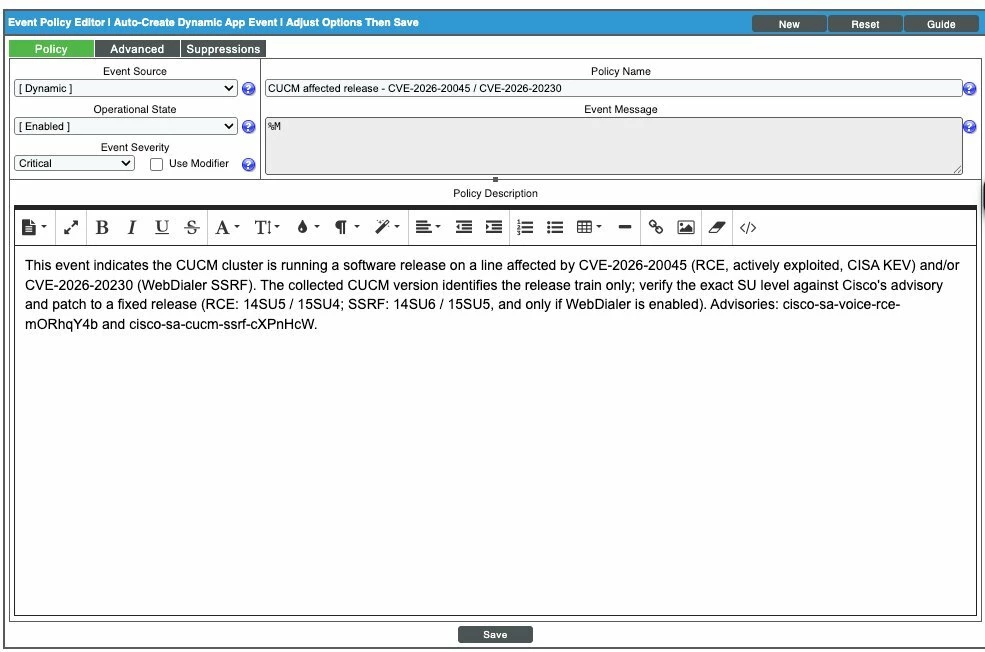
Event Policy Editor — Event Source = Dynamic (pre-filled), Operational State = Enabled, Severity = Critical, Event Message = %M, and the Policy Description giving triage context.
What the alert logic should encode
| Condition | Result |
|---|---|
| Release 15 below 15SU4 / Release 14 below 14SU5, no confirmed COP (RCE) | EXPOSED — CRITICAL |
| WebDialer Started and release below SSRF fix (14<14SU6 / 15<15SU5) | EXPOSED (SSRF) |
| WebDialer Not Running / Stopped | NOT EXPOSED to SSRF (RCE still applies) |
| Below a fixed SU but a COP patch may be installed | INDETERMINATE — verify patch records |
| Version not collected (Publisher unreachable / SNMP-only) | INSUFFICIENT DATA |
These instructions are intentionally generic — a custom event that matches a device's software version and checks whether a service is running. Adjust the match values to fit your environment or to cover other advisories you encounter.