Question

Inverse Attribute Device Group Event Suppression

  • April 27, 2026
  • 14 replies
  • 43 views

joebiwankenobi
Forum|alt.badge.img

Implementing SSL Cert monitoring due to the new policy for Certificate renewal times, i have discovered that you cannot easily only allow SSL Expiry Events for listed servers.

As we have thousands of “internal” self-signed certs, a lot of these have expired but do not need to be re-issued.

What i’d like to be able to do is to create a “Device Group” and add in the Servers that i DO want to alert on…

using a Dynamic Rule to look for a custom “Atribute” on the device for “SSL_Monitoring” but use a “!*” rule to invert the device group.

that way this Device Group can be added into the “Suppressions” on the SSL Events.

Currently this does not work and i wold need to add Device names into the Rule manually as an inverse.

this method will work but will get very messy and will reply solely on my as the administrator to update the list, Ideally other staff should just be able to add that custom “Attribute” and the server will be added automatically and the Inverse rule would flip the logic and allow that device to alert on SSL Cert expiration.

14 replies

  • Community Manager
  • April 27, 2026

What i’d like to be able to do is to create a “Device Group” and add in the Servers that i DO want to alert on…

using a Dynamic Rule to look for a custom “Atribute” on the device for “SSL_Monitoring” but use a “!*” rule to invert the device group.

that way this Device Group can be added into the “Suppressions” on the SSL Events.

Currently this does not work and i wold need to add Device names into the Rule manually as an inverse.


@joebiwankenobi While this sounds more like a post for our Discussions section, I’ll first respond here. You describe wanting to isolate a subset of your devices based on an aligned custom attribute value to ensure that they continue to generate events regarding SSL certificate expiration while suppressing such events from generating on all other devices. You’ve also stated as trying to create a Device Group utilizing a dynamic rule to select all devices that do not have the attribute value, but state that “this does not work”.

Can you elaborate as to where you’re currently seeing a breakdown in the approach? Are you getting the expected device group membership? Are you seeing events generated despite the respective device group being aligned for event policy suppression? 


joebiwankenobi
Forum|alt.badge.img

Hi Bryan

I’ve currently not allowed these Events to generate External Tickets to our NOC until i can be sure the Device Groups are working.

Under the “Device Group > create”  I am using the Dynamic Rule Option to add in ADD devices (except the “!*” for the custom Attribute “SSL_Monitoring”) 


in the Dynamic Rule:

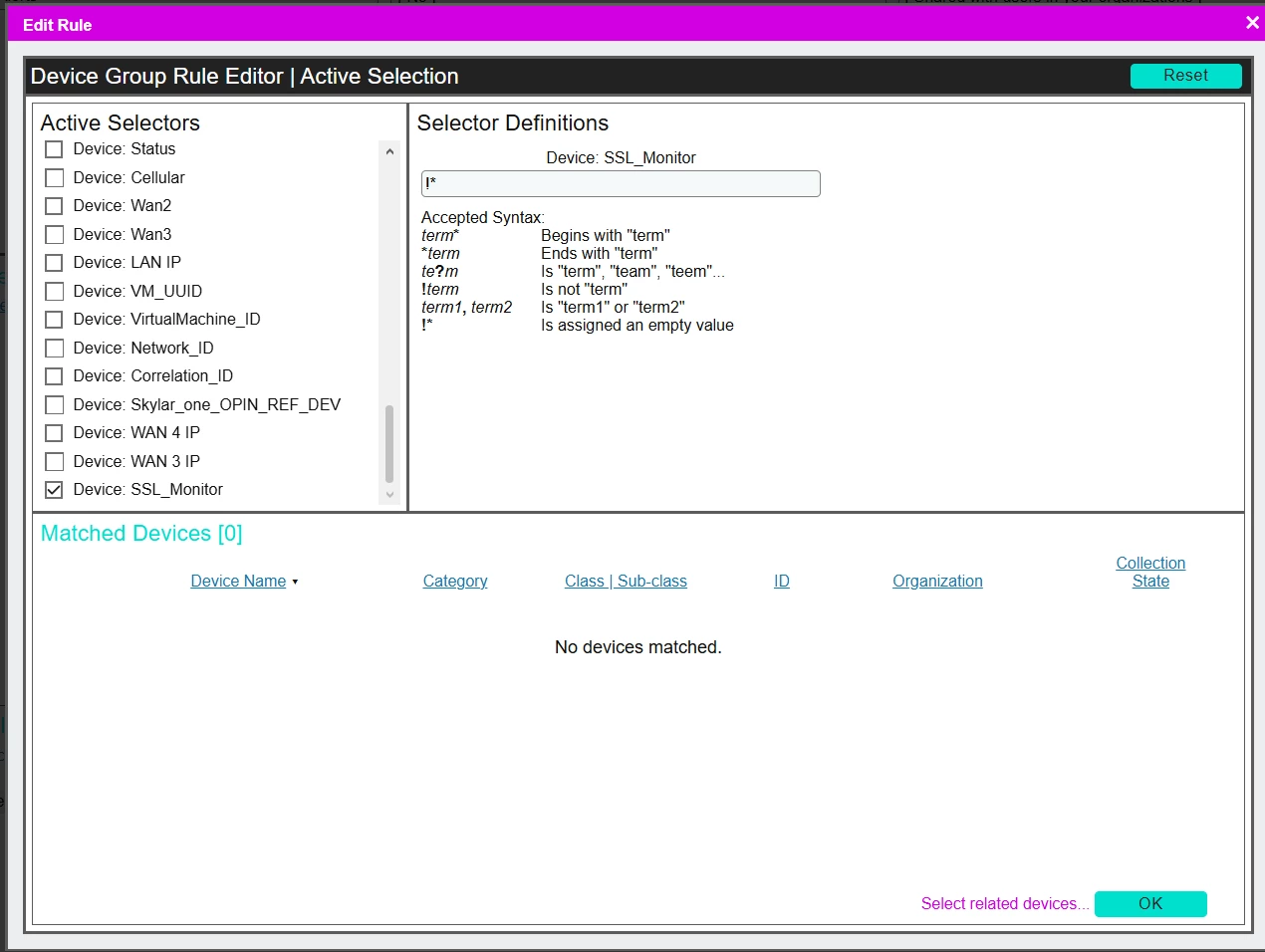
Active Selectors = “SSL_Monitoring”

Selector Definitions = “!*”

Under matched devices - nothing shows.. we should be seeing thousands of devices in this list, just not the ones with “SSL_Monitoring” custom attribute


Kind Regards 


Joe


  • Community Manager
  • April 27, 2026

I see. By that definition you’re looking for the device group membership to be all devices that have the “SSL_Monitoring” custom attribute aligned and that that attribute has an empty value. Is this “SSL_Monitoring” custom attribute a base attribute or an extended attribute?


joebiwankenobi
Forum|alt.badge.img

its an “extended” attribute and has an Interger of 1.

The thoughh being that we Suppress ALL devices for an Event but the Servers with this custom attribute are Device Group inverted so only these devices are not Suppressed for the Selected Events 


Thank you 


  • Community Manager
  • April 27, 2026

That explains why your setup is not working as you thought. Extended custom attributes are opt-in per entity so the current criteria for the device group membership being all devices that have the “SSL_Monitoring” custom attribute aligned and that that attribute has an empty value is resulting in an empty list as the only devices that have this custom attribute aligned also have a value set to “1”; it will not return devices that do not have this extended attribute aligned.


joebiwankenobi
Forum|alt.badge.img

ok, so could be the reccommenation here?

Will a “Base” attribute work do i need to do something else to get this working.


Thank you 


  • Community Manager
  • April 27, 2026

A base attribute inherently applies to all members of the respective entity type and therefore all members would have the attribute aligned and default to having an empty value until a value as set; this would work with a base attribute the way you were attempting to do so prior with an extended attribute


joebiwankenobi
Forum|alt.badge.img

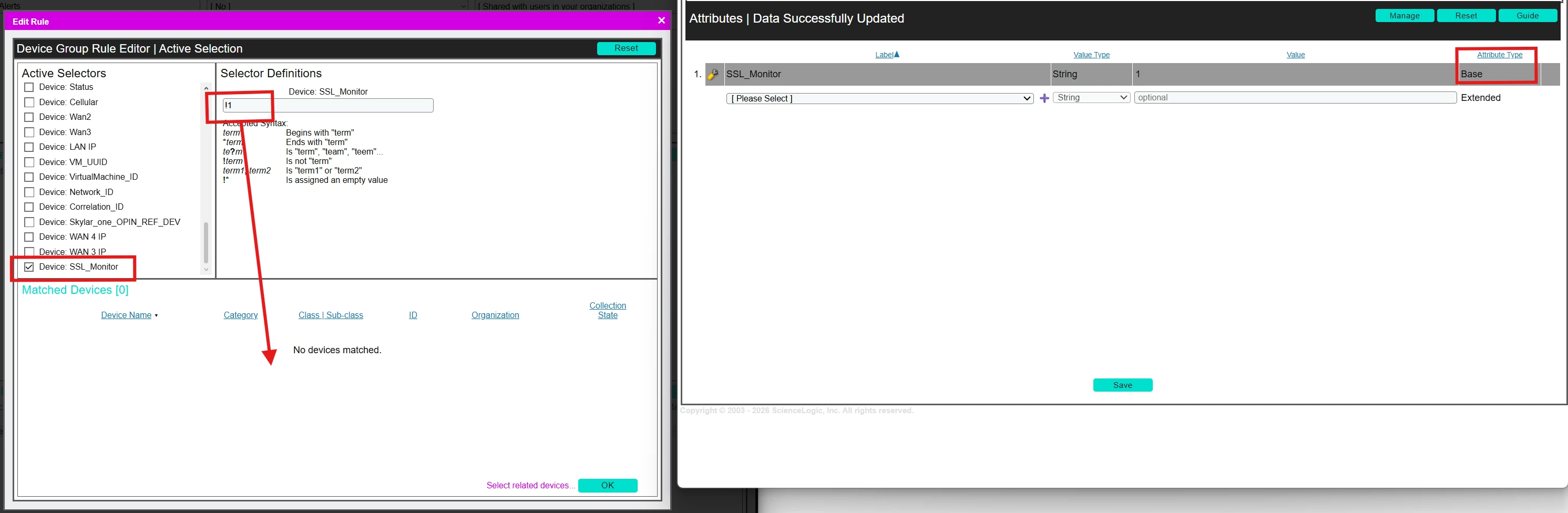
hmmm ok, I’ve removed the “Extended” attribute and re-created it as a “Base” attribute, added this to the server i do want to monitor and set the value to “1”

Then gone back into the Device Group > Dynamic Rule and selected the “Active Selectors” to Device: SSL_Monitor  (the newly created base attribute)  then added “!1” into the “Selector definitions”, but no devices are pulled back into the “Matched Devices” field


ideally i need to see ALL devices in here except the one which has the “SSL_Monitoring” attribute.

thank you 


  • Community Manager
  • April 28, 2026

@joebiwankenobi Can you try setting Selector definitions value so that it looks for empty values only by reading:
!*


joebiwankenobi
Forum|alt.badge.img

Hi Bryan

Done that.. still returns No Devices.


  • Community Manager
  • April 28, 2026

@joebiwankenobi Can you confirm the Skylar One version you’re currently working with? I’d like to see if there’s been any changes across versions that may account for what appears to be a discrepancy between what I’ve setup locally and the behavior you’re documenting.


joebiwankenobi
Forum|alt.badge.img

Hi Bryan

Sure, we recently upgraded to 12.5.4


  • Community Manager
  • April 29, 2026

My apologies for the amount of back and forth on this. I had validated my recommendation against our in-hardening 12.5.20, but had not initially considered the potential of changes within that relese impacting this behavior, however I now stand corrected. As will be noted in the upcoming respective release notes a defect has been addressed within this upcoming release that has been noted to exist in product since, at least, v11.3.1:
 

For device group rules the base custom attributes selectors in case of search for empty values now also include devices with no value assign for the specific custom attribute on the result (Jira ID: EM-63886)


As a result of this defect confirmation I’m afraid that the recommended inversion logic for base custom attributes for empty values will not function in your current release line.


joebiwankenobi
Forum|alt.badge.img
  • Author
  • Contributor
  • April 29, 2026

Hi Bryan

Many thanks for sticking with this.

shame this does not work but I have been playing with the “SSL/TLS Certificate Check” Dynamic App (converted it to Python3 and changed the EE Library dependencies) and have got this to work by adding that DA to the servers i want to be alerted on.

Hopefully SL will put some time into this and build SSL Monitoring into the platform itself.


Kind Regards 

Joe