Solved

Low Code error when running Dynamic App

  • October 29, 2024
  • 3 replies
  • 1 view

Forum|alt.badge.img

Hi All, I'm new to the Low Code tools/DA builder. I just created a new DA using the DA Builder, and uploaded to my stack. I also have the Low Code Tools Powerpack v101 installed on my system. 

I'm seeing the following error when I try to run the DA and it seems like I'm possibly just missing some snippet or module and I was wondering if I'm missing something simple:

54. Running Snippet 3586 55. Error encountered while executing snippet. Error explanation: App: 3847, Snippet: 3586 threw exception: No module named apps.errors (ImportError: No module named apps.errors File "<string>", line 1, in <module>) 56. Snippet 3586 execution failed.

 

Best answer by TaylorJohnson

The whole idea of the DAB is that you shouldn't have to read any documentation (ideally), so this hiccup is certainly one we hope to help with eventually. It's supposed to set an EE for you, but I think the DAB 1.1.1 is expecting Low Code Tools v100, not v101. We'll double check on this for the DAB 1.2 release (coming very soon!) 

3 replies

  • Community Manager
  • October 29, 2024

Hello!

What version of SL1?

What version of the DAB?

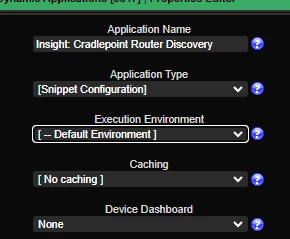
Does the Dynamic Application have the Low Code Tools execution environment aligned? Depending on what version of the DAB you have, there may be a mismatch on the expected execution environment to be aligned when the DAB exports it to your SL1. We should have it documented what version of the Low Code Tools PowerPack and DAB are meant to work together. 

- Taylor 


Forum|alt.badge.img
  • Author
  • Contributor II
  • October 29, 2024

ScienceLogic 12.1.1, DAB 1.1.1, It looks like the aligned EE is the Default env, it looks like I should have aligned the Low Code EE (rftm Jeff! hahaha)


Forum|alt.badge.img
  • Author
  • Contributor II
  • October 29, 2024

I assigned the 101 EE and it seems to have worked fine anyway, thanks again!