Make Skylar one Filesystem to valid type

  • May 26, 2026
  • 5 replies
  • 62 views

Issac
Forum|alt.badge.img+1

Hi All,


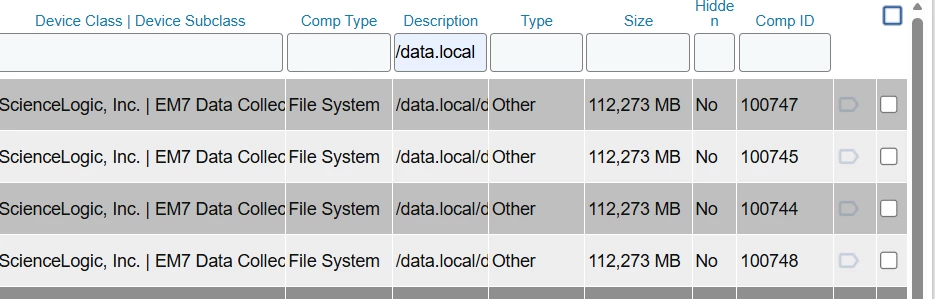
 As of now all the filesystem for SL1 data collector and message collector type is showing as other where monitoring of FS is disabled at default.


The Appliance must be customized to make  valid type so that this will not be hidden at default.
 

5 replies

Forum|alt.badge.img
  • Community Manager
  • May 27, 2026

@Issac Can you elaborate? Your screen capture shows that the respective disks were discovered and are not marked as Hidden and therefore they should be visible within the respective device’s Performance tab.

You also go on to say “The Appliance must be customized to make  valid type so that this will not be hidden at default”. To what customizations are you referring. Is this an activity you have undergone through our Support team via an incident?


Issac
Forum|alt.badge.img+1
  • Author
  • Contributor III
  • May 28, 2026

@BryanHarding  Actually i have enabled to unhide for monitoring , Do yo have any KB to make it valid type?


Forum|alt.badge.img
  • Community Manager
  • June 1, 2026

@BryanHarding  Actually i have enabled to unhide for monitoring , Do yo have any KB to make it valid type?

Have you prior raised this as an incident with Support, or do you have an active case open? While not my area of expertise, I’ve tested locally and discovered Skylar One collectors and the respective /data.local file systems were discovered and despite classifying as “Other” they were not hidden by default (no alteration of the default System>Settings>Behavior setting) and their metrics were visible and accessible via the monitored device’s Performance tab. Based on your inquiry it would appear that you are experiencing a difference in behavior, in which case, further investigation would be required.


Issac
Forum|alt.badge.img+1
  • Author
  • Contributor III
  • June 2, 2026

But if don't hide other by default there will be many temporary partition discovery for linux servers which is monitored 


mleonberger
Forum|alt.badge.img
  • Employee
  • June 5, 2026

This behavior occurs when a Skylar One appliance has been discovered with a device category other than System.EM7. If the device category is showing as System.SL1, navigate to System > Customize > Device Categories and rename it to prevent this issue going forward.

You will also need to perform a one-time bulk unhide of file systems for devices in the ScienceLogic device class. Navigate to Devices > Hardware, then filter by Device Class = ScienceLogic, Component Type = File System, and Hidden = Yes. Bulk select the results and unhide.