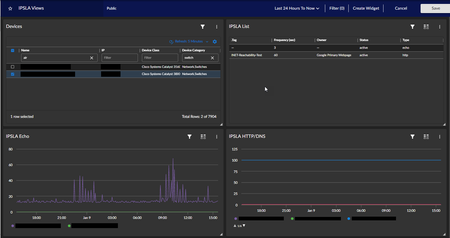
Widget visualization: Table vs. Configuration Table
I'm working on building out a dashboard for IPSLA tests. I'd like one widget for the devices that drives another widget showing a list of the IPSLA tests on the selected device. I'd then like to have the widget with the list of tests drive the widget with the line graph visualization. Should be simple, right? The issue I'm running in to is with the widget for the list of IPSLA tests. If I select a Table visualization, it only shows one of the tests configured on the selected device. If I select a Configuration Table visualization, it shows a list of all of the tests on the selected device. The problem is that the Configuration Table visualization does not support driving other widgets (like the one with the line graph visualization). Any thoughts on how to make this work? Thanks.40Views1like0Comments
AP2 Dashboarding for "Web Content"
Hi All, I have a Web Content monitor that is aligned to a blank Virtual Device. I want to chart the metrics that are in the Web Content monitor (availability, page size, download speed) in an AP2 dashboard. I'm just trying to get an initial table setup, but will probably setup a line graph later. Right now no matter what I search for in "Metrics and Properties" on the left column, I can't seem to find the Web Content metrics. Does anyone have any tips? Dashboard metric naming seems to be all over the place for some out of the box things. On top of that, just using the basic "Vitals > Availability" doesn't return any data.Solved134Views1like2Comments