Microsoft Teams v2.0.1 SyncPack is Released
Hello, We are pleased to announce the release of Microsoft Teams v2.0.1 SyncPack. The following issue was addressed in this release: Addressed an issue that prevented configuration objects from being visible after installing the SyncPack. (Case: 00559847) Thank you, Release Management15Views1like2CommentsSkylar Compliance Automation PowerPack v105
Hello, We are pleased to announce the release of Skylar Compliance Automation PowerPack v105. The following issues were addressed in this release: With this release, ScienceLogic has rebranded the "Restorepoint Automation" PowerPack to the "Skylar Compliance Automation" PowerPack. This change, as well as similar branding changes to the other products offered by ScienceLogic, reflects ScienceLogic's commitment to delivering intelligence that accelerates outcomes through service-centric observability, AI-driven operations, and intelligent automation. For more information, see the ScienceLogic website (https://sciencelogic.com/platform/overview). Resolved an indentation error that caused the "Restorepoint: Generic Action type" snippet to fail when executing the "Start Restorepoint Backup" Run Book automation policy. (Case: 00534255) Thank you, Release Management5Views0likes0CommentsServiceNow Incidents SyncPack v4.2.1 is Released
Hello, We are pleased to announce the release of ServiceNow Incidents SyncPack v4.2.1. Version 4.2.1 of the ServiceNow Incidents SyncPack updates the "Lock" feature to use a Redis lock instead of a Couchbase lock, which allows the SyncPack to function correctly when using DynamoDB or Couchbase as a database. You can download this update from the Support Center page. NOTE: This SyncPack uses the "ServiceNow Base Pack" PowerPack. Thank you, Release Management11Views1like0CommentsSkylar Automation v3.3.0 and Skyautoctl v2.9.0 are Released
Hello, We are pleased to announce the release of Skylar Automation platform v3.3.0 and the Skylar Automation skyautoctl Command Line Utility v2.9.0. You can download these releases from here: https://support.sciencelogic.com/s/release-version/aBuVL00000019Vt0AI/skylar-automation-33 Skylar Automation (formerly PowerFlow) version 3.3.0 rebrands PowerFlow to Skylar Automation, rebrands powerflowcontrol (pfctl) to skyautocontrol, updates the user interface of the SyncPacks page, and addresses multiple issues. Features PowerFlow is now Skylar Automation. With this release, ScienceLogic has rebranded PowerFlow to Skylar Automation. You will notice this rebranding throughout the platform. This change, as well as similar branding changes to the other products offered by ScienceLogic, reflects ScienceLogic's commitment to delivering intelligence that accelerates outcomes through service-centric observability, AI-driven operations, and intelligent automation. For more information, see the ScienceLogic website (https://sciencelogic.com/platform/overview). The powerflowcontrol (pfctl) command-line utility has been rebranded to skyautocontrol (skyautoctl) as part of the rebrand from PowerFlow to Skylar Automation. All of the older pfctl and iservicecontrol commands still function. Updated the user interface of the SyncPacks page in Skylar Automation to improve clarity around the installed version of SyncPacks: Updated the Active Version column to Installed Version Updated the Change Active Version option in the Actions menu to Change Installed Version Skylar Automation v3.3.0 includes package updates to improve security and system performance. Among other things, these updates address critical vulnerability CVE-2025-49844. Updated Skylar Automation to prevent search engines from indexing Skylar Automation systems by default, improving system privacy and reducing the risk of external exposure. Updated the Redis service to Redis 7.4.6. The following images are included in this release of Skylar Automation: registry.scilo.tools/sciencelogic/sa-api:rhel3.3.0 registry.scilo.tools/sciencelogic/sa-couchbase:6.6.0-15 registry.scilo.tools/sciencelogic/sa-dex:2.37.1-12 egistry.scilo.tools/sciencelogic/sa-worker:rhel3.3.0 registry.scilo.tools/sciencelogic/sa-gui:3.3.0 registry.scilo.tools/sciencelogic/sa-pypi:6.3.1-16 registry.scilo.tools/sciencelogic/sa-rabbit:3.8.35-8 registry.scilo.tools/sciencelogic/sa-redis:7.4.6-0 Issues Addressed The following issues were addressed in this release: Improved stability when using the broker_load_from_backend feature. Skylar Automation steprunner services now handle missing task bodies in Redis more effectively. If a task's payload has been evicted from Redis, the worker will mark the task as failed instead of hanging. This keeps the worker healthy and allows other tasks in the queue to process normally. (Cases: 00554106, 00554534) In some Dex OIDC connector configurations used for Skylar Automation authentication, the email claim may not be provided. Previously, this caused endpoints that relied on the current user identity to fail, showing 500 errors. Now, when the email is missing, Skylar Automation uses the username to identify the user. This ensures widgets, favorites, and related features work correctly by consistently associating data with the authenticated user, even when the email claim is unavailable. (Case: 00524073) Updated the Skylar Automation backup application to clean up the staging directories inside the steprunner containers and to ensure that if the backup fails to copy to a remote system, the temporary files do not hang in the system. (Case: 00513115) Improved error handling to provide more information about why the graphical user interface is not displaying the SystemHealth diagram after logging into Skylar Automation. (Case: 00467441) Addressed an issue that prevented the "Timed Removal" application from running. Thank you, Release Management17Views0likes0Comments
Help with Custom Parameters for 'Sync Devices from SL1 to ServiceNow'
Hi all, I’m working on creating a schedule for the 'Sync Devices from SL1 to ServiceNow' application, and I’m trying to set up some custom parameters. Specifically, I want to configure custom settings for: - Include Org - Selected Device - Excluded Device I’ve written the code and tested it multiple times, but I’m having trouble getting it to work as expected. Has anyone successfully implemented custom parameters for these settings? Or is it even possible to override them with custom parameters in the current setup? Any help or guidance would be greatly appreciated! Thanks in advance!25Views0likes0CommentsServiceNow CMDB SyncPack v3.6.4 Released
Hello, We are pleased to announce the release of our ServiceNow CMDB SyncPack v3.6.4. This SyncPack includes the following update: Addressed an issue caused by changes to the ServiceNow batch endpoint format when sending CIs to ServiceNow. Spaces are no longer accepted in the URL starting with ServiceNow Zurich. Thank you, Release Management21Views0likes0CommentsSL1 PowerFlow v3.2.0 & PFCTL v2.8.0 Release
Hello, We are pleased to announce the release of SL1 PowerFlow v3.2.0, as well as the release of SL1 PowerFlow powerflowcontrol (pfctl) command-line utility v2.8.0. Both of these releases are included on the customer portal for download under Product Downloads > PowerFlow Platform > SL1 - PowerFlow 3.2.0. SL1 PowerFlow v3.2.0 adds the ability to bulk download reports, adds a new API endpoint to support bulk downloading of reports, adds two new configuration options to the docker-compose.yml file, and addresses multiple issues. Read on for more details or see the SL1 PowerFlow Release Notes. SL1 PowerFlow powerflowcontrol (pfctl) command-line utility v2.8.0 updates Couchbase-related checks, updates pfctl checks to require HTTPS certificates, and updates the pfctl init-sps action to use the HOST_ ADDRESS for the PowerFlow system. See the SL1 PowerFlow powerflowcontrol (pfctl) command-line utility v2.8.0 Release Notes. Features (SL1 PowerFlow v3.2.0) This section covers the features that are included in SL1 PowerFlow Platform version 3.2.0: You can now bulk download reports in PowerFlow. When bulk downloading, you have the option to select multiple specific instances of a report to download, or you can select all available instances to download. Added the new DELETE/api/v1/reports/batch API endpoint, which allows you to delete reports in a batch. For more details about using the new endpoint, see the API documentation in the PowerFlow user interface. Added two new configuration options to the docker-compose.yml file to allow access to the Couchbase and RabbitMQ user interfaces without requiring Dex authentication: DISABLE_DEX_AUTH. This option allows you to disable Dex authentication for the Couchbase and RabbitMQ services. ENABLE_SECONDARY_CB_UI. This option allows you to access the Couchbase user interface on port 8091 through secondary nodes without additional port openings. NOTE: The DISABLE_DEX_AUTH and ENABLE_SECONDARY_CB_UI configuration options are intended only for troubleshooting and should be turned off when the PowerFlow system is stable. Blank spaces in configuration options or application variables are now automatically stripped by the PowerFlow API to prevent the spaces from causing issues when PowerFlow reads the values. Updated API service initialization messages to improve clarity when Couchbase indexes are created. Updated the db_host configuration option to function more uniformly across all PowerFlow services. The following images are included in this release of PowerFlow: registry.scilo.tools/sciencelogic/pf-api:rhel3.2.0 registry.scilo.tools/sciencelogic/pf-couchbase:6.6.0-14 registry.scilo.tools/sciencelogic/pf-dex:2.37.1-11 registry.scilo.tools/sciencelogic/pf-worker:rhel3.2.0 registry.scilo.tools/sciencelogic/pf-gui:3.2.0 registry.scilo.tools/sciencelogic/pf-pypi:6.3.1-15 registry.scilo.tools/sciencelogic/pf-rabbit:3.8.35-7 registry.scilo.tools/sciencelogic/pf-redis:6.2.14-6 Issues Addressed (SL1 PowerFlow v3.2.0) The following issues were addressed in this release: Addressed an issue that caused device sync to fail due to region-specific cache key issues. (Case: 00422286) Addressed an issue that caused intermittent authentication failure when using SSO credentials to access PowerFlow. (Case: 00352925) Addressed an issue that caused the pfctl utility to fail when changing the PowerFlow password if the "dollar-sign" character ($) was used in the new password. You can now use the $ character in the PowerFlow password. (Case:00484230) Updated custom mappings values so that you can set any value you want before PowerFlow checks whether the value is unique. Previously, if you attempted to add a custom value and any part of the string matched an existing custom value, you could not attempt to save the value. Addressed an issue that prevented users with view-only permissions from accepting the End User License Agreement (EULA). Additionally, we have released SL1 PowerFlow System Utils v1.2.1 SyncPack today. This release is available on the customer portal here. This SyncPack requires the Base Steps SyncPack. Thank you, Release Management64Views0likes3CommentsCMDB Sync relation overrides
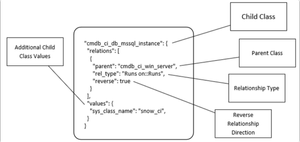
Device sync has quite a mandatory configuration option about relations between SL1 devices vs Snow CIs. We have used that a lot but now struggling with some issue we noticed this "values" section. In documentation we can see this picture: which shows that there is part "values" and it is told that they are Additional Child Class Values. Then in example we have this { "cmdb_ci_db_mssql_instance": { "relations": [ { "parent": "cmdb_ci_win_server", "rel_type": "Runs on::Runs", "reverse": true } ], "values": {"sys_class_name": "snow_ci_class", "instance_name": "name"} }, "cmdb_ci_db_mssql_database": { "relations": [ { "parent": "cmdb_ci_db_mssql_instance", "rel_type": "Contains::Contained by", "reverse": false } ], "values": {"sys_class_name": "snow_ci_class", "database": "name"} }, "cmdb_ci_db_mssql_server": { "relations": [ { "parent": "cmdb_ci_win_server", "rel_type": "Runs on::Runs", "reverse": true } ], "values": {"sys_class_name": "snow_ci_class", "instance_name": "name"} } } Not much told about those in documentation, so few questions arise: when do we need to use those? Seems to be optional anyway. what are the field names to be used here. In the example snow_ci_class seems to be coming from device attributes/field from SL1, then probably the key part is the snow field? Is that correct?36Views1like0CommentsBase Steps SyncPack v1.6.0 Release
Hello, We are pleased to announce the release of Base Steps SyncPack v1.6.0. This release deprecates the QueryGQL step from the SyncPack (although it is not removed) and adds the GQLRequest step, which you should use to make GraphQL steps going forward. This release addresses two more issues: Addressed an issue that caused the "Sync Service Requests from ServiceNow to SL1" application to fail after upgrading SL1 from version 12.1.2 to 12.3.5. (Case: 00532575) Addressed an issue that caused the "DeleteFromCache" step to fail when using the 'equals' lookup type instead of 'like'. This release is now available on the customer portal under Product Downloads > PowerPacks & SyncPacks here. Read the full release notes here: https://docs.sciencelogic.com/powerpack_release_notes/sciencelogic_base_steps_syncpack-v160_release_notes.pdf Thank you, Release Management29Views0likes0Comments